
Managing Voucher Usage in SafeTalk

After creating vouchers, SafeTalk makes it easy to monitor how they are being used.
Tracking voucher usage helps you understand the effectiveness of promotions, manage client redemptions, and monitor the impact of discounts on your practice revenue.
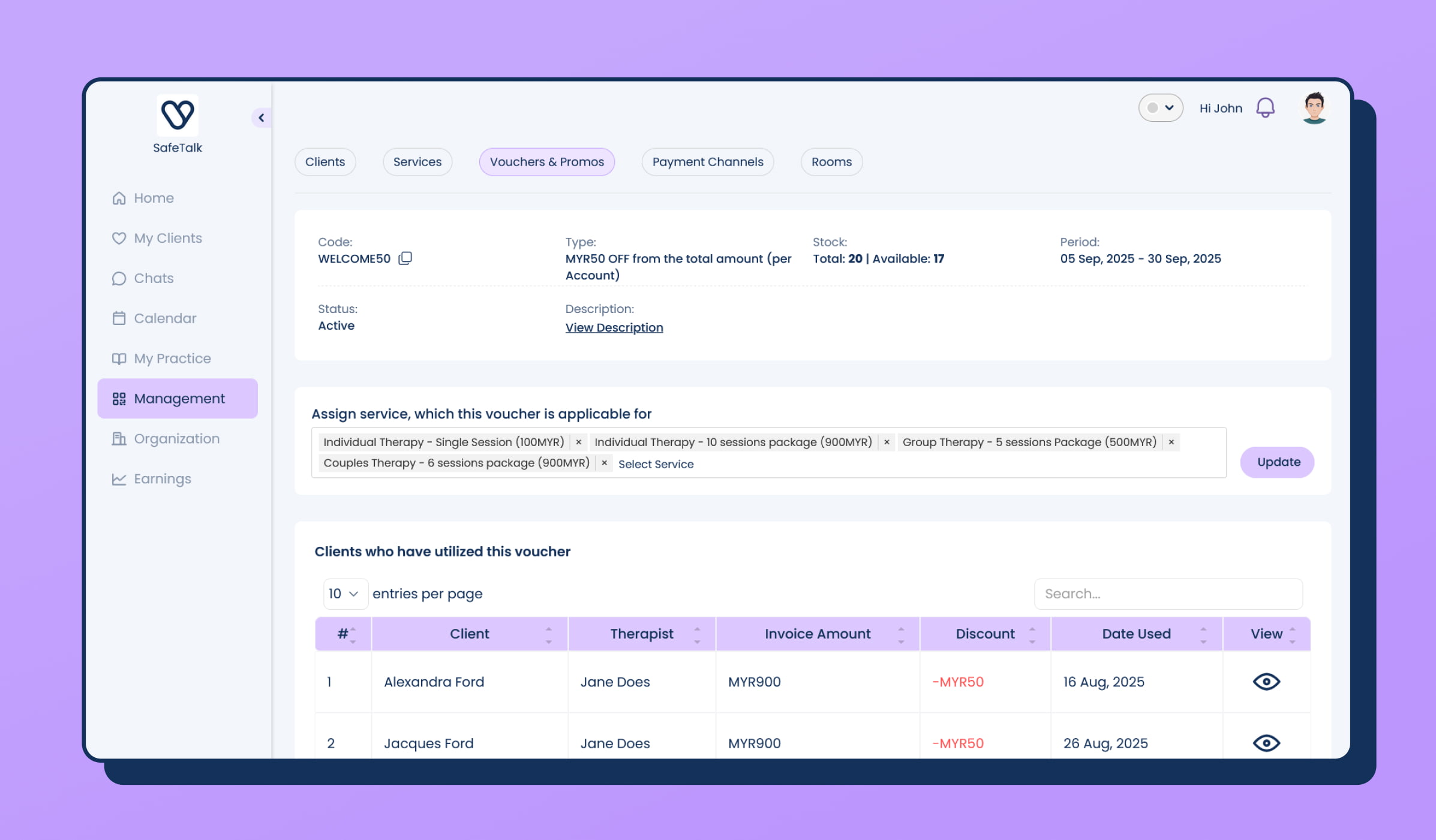
View Voucher Usage Details
From the voucher details page, you can view:
- Which clients have redeemed the voucher
- Voucher usage history
- Remaining voucher balance
This is especially useful for sharable vouchers where the balance is used across multiple clients.
Track Voucher Impact on Earnings
Payments made using vouchers are clearly marked in the Earnings page.
This allows you to:
- Monitor promotional activity
- Understand how discounts affect revenue
- Track voucher-based payments
Adjust Vouchers on Invoices
SafeTalk gives you flexibility when managing invoices.
You can:
Remove a Voucher
If the wrong voucher was applied to an invoice, you can remove it.
Add a Voucher
If a voucher was missed during invoice creation, you can add it afterwards.
Examples of Using Vouchers
Attract New Clients
Example:
“10% off your first session — use code NEW10”
Seasonal Promotions
Example:
“RM100 off during Mental Health Awareness Month”
Corporate Partnerships
Example:
A company purchases a RM2,000 sharable voucher for employees to access counselling sessions.
Final Tips
- Keep voucher codes simple and professional.
- Track voucher usage to understand which promotions bring value.
- Use expiry dates to encourage timely redemption.
Vouchers in SafeTalk support everything from small promotions to large corporate programs, helping practices attract clients and build stronger relationships.